


The Role of Camera Reports on Set
On any professional shoot, the camera report is one of those things that often goes unnoticed—until something goes wrong. It’s the technical document that records what was shot, how it was shot and under what conditions. Its purpose is to bridge the gap between what happens on set and the information that DITs, editorial and post-production teams need to work with confidence and context.
It’s usually completed by a camera assistant throughout the shooting day. It may seem like just another administrative task, but it’s far more than that. When a camera report is incomplete, arrives late or contains errors, the consequences extend well beyond the camera department. They affect the entire workflow.
Yet camera reporting remains one of the least modernized processes on set. While much of the technical workflow has gone digital, camera reports are still frequently handled using paper, handwritten notes, photos sent through WhatsApp and manual data entry afterwards.
Normalmente lo rellena el auxiliar de cámara durante la jornada. Puede parecer un trámite más, pero no lo es: cuando un parte está incompleto, llega tarde o contiene errores, el problema no se queda en el departamento de cámara. Afecta al flujo entero.
Y sin embargo, sigue siendo uno de los procesos menos evolucionados del rodaje. Mientras gran parte del trabajo técnico se ha digitalizado, los partes de cámara todavía se resuelven muchas veces con papel, anotaciones a mano, fotos por WhatsApp y transcripciones posteriores.
Index
1. What Is a Camera Report?
A camera report is a production document that systematically records information about the footage captured during a shooting day. Its purpose is to clearly document everything needed to identify, organize and understand the material recorded on set.
It’s much more than a log sheet. It’s a working tool. From basic information such as scene, shot and take numbers to technical settings, issues and notes, a camera report captures details that can become essential during DIT, editorial and post-production workflows.
A clip without context still exists, but identifying, locating and working with it becomes more difficult. A clip accompanied by a well-maintained camera report enters the workflow with much greater clarity.
No es solo una hoja de registro. Es una herramienta de trabajo. En él se documenta desde lo más básico —escena, plano y toma— hasta detalles técnicos, incidencias o notas que después pueden resultar decisivas en el flujo de DIT, montaje y postproducción.
Un clip sin contexto puede existir, pero cuesta más interpretarlo, localizarlo o aprovecharlo bien. Un clip acompañado de un buen parte entra en el flujo con mucha más claridad.
2. What Is a Camera Report Used For?
Camera reports serve several essential purposes throughout the production workflow.
Footage tracking: They help identify what was recorded, how many takes were captured, which recording media contains the footage and which camera settings were used.
Communication between departments: They connect the camera department with DIT, editorial and post-production. Without this information, footage loses context, creating questions that require additional time and effort to resolve.
Media traceability: They make it easier to locate any clip, card or reel, helping prevent missing footage, misinterpretations and confusion between takes.
Post-production organization: They help ensure footage arrives properly documented, making it easier to organize, review and edit.
Technical record of the shooting day: They document what actually happened on set, providing a reliable reference for the rest of the workflow.

3. Who Fills Out the Camera Report?
On most productions, the camera report is completed by a camera assistant, usually the 2nd AC or loader. This person is typically closely involved in the workflow surrounding recording media, slates, scene references and the practical continuity of the shooting day.
However, responsibilities may vary depending on the production. Larger camera departments may assign more specialized tasks, while smaller crews might have the 1st AC, Video Assist operator or even the DIT handling certain aspects of the reporting process.
In any case, responsibility generally sits within the camera department, even though the information is used by many other departments.
And this brings us to something anyone who has worked on set knows: camera reports are rarely filled out under ideal conditions. They’re completed between takes, under time pressure, surrounded by noise and distractions, and all too often by trying to reconstruct information afterwards.
Aun así, esto puede variar según el tipo de producción. En equipos grandes puede haber un reparto más específico de funciones. En producciones más pequeñas, determinadas tareas pueden recaer en el 1º AC, video assist o incluso el DIT, dependiendo de cómo se haya organizado el trabajo.
En cualquier caso, la responsabilidad nace dentro del departamento de cámara, aunque su impacto alcance a muchos más perfiles.
Y aquí entra una realidad que cualquiera que haya pisado un set conoce bien: el parte rara vez se rellena en condiciones ideales. Se hace entre toma y toma, con prisas, con ruido, con presión y, demasiadas veces, reconstruyendo información a posteriori.
4. The Relationship Between Camera Assistants and DITs
One of the most important aspects of camera reporting is the relationship between the person recording the information and the person who needs to work with it afterwards.
The camera assistant needs to document the shoot quickly and efficiently, while the DIT needs clear, consistent and usable information.
When this connection breaks down, familiar problems arise: inconsistent naming conventions, incorrectly identified takes, uncertain card references, ambiguous notes and information that someone must interpret and manually enter again.
When the process works well, the camera report becomes more than a simple record. It becomes a tool for maintaining continuity throughout the workflow.
The camera assistant isn’t just writing things down; they’re preparing useful information. And the DIT isn’t simply receiving data; they’re getting actionable context to organize, review and synchronize footage more effectively.
That’s why camera reporting isn’t merely an administrative task. It’s about how information moves between two essential roles in the technical production workflow.
Cuando ese puente falla, aparecen los problemas habituales: nomenclaturas inconsistentes, tomas mal identificadas, tarjetas dudosas, observaciones ambiguas o información que alguien tiene que reinterpretar y volver a introducir manualmente.
Cuando funciona bien, el parte deja de ser un simple registro y se convierte en una herramienta de continuidad. El auxiliar no solo anota: prepara información útil. Y el DIT no solo recibe datos: recibe contexto accionable para organizar, revisar y sincronizar mejor el material.
Por eso, cuando se habla de partes de cámara, no se está hablando solo de administración de rodaje. Se está hablando de cómo circula la información entre dos perfiles clave del flujo técnico.

5. What Information Should a Camera Report Include?
No todos los rodajes utilizan exactamente el mismo formato, pero un parte de cámara completo suele incluir una base común de información.
Not every production uses exactly the same format, but a complete camera report generally includes a common set of information.
General information: Date, shooting day number, production name and camera identification. It’s also useful to identify the key technical crew members involved, especially when the workflow requires more precise tracking.
Recording media information: Card number, reel, roll or recording media identifier. These references are essential for maintaining the connection between what happened on set and the resulting footage.
Scene and take information: Sequence, shot and take numbers. This is what connects the technical media with the narrative structure of the production.
Technical information: Depending on the production, this may include frame rate, ISO, shutter settings, color temperature, lenses, filters and other relevant parameters.
Additional notes: Preferred takes, technical issues, changes during the shooting day or any comments that may help interpret the footage later. Productions with more specific requirements may also include VFX-related fields, such as camera height, distance, tilt and other measurements.
The goal isn’t to create the longest possible report. It’s to create one that’s clear, consistent and genuinely useful.
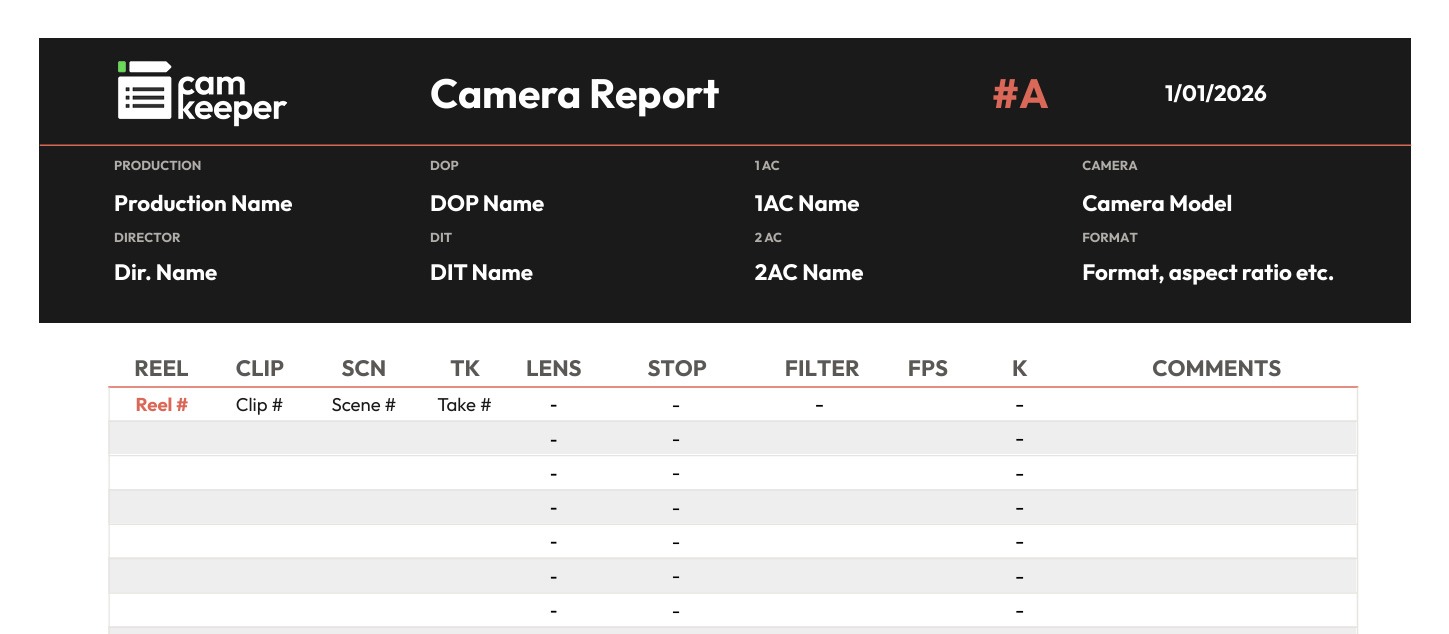
If you’d like to start with a simple structure, we’ve created a free camera report template in Google Sheets that you can copy and adapt to your own productions. It includes essential fields for recording clips, scenes, takes, lenses, frame rates, filters, color temperature and notes.
6. How to Fill Out a Camera Report Step by Step
Although every camera department has its own way of working, the general process tends to follow a similar structure.
Prepare before shooting: Before the shooting day begins, enter the essential project information: production name, shooting day, cameras involved and any general technical settings that are unlikely to change throughout the day.
Identify the recording media: Every card, reel or recording medium should be clearly identified. If this information is incorrect or incomplete, tracking the footage later becomes difficult from the very beginning.
Link footage to scenes, shots and takes: This is where the report connects technical information with the narrative structure. Knowing that a clip exists isn’t enough; you need to know exactly what it represents within the shoot.
Record technical settings and notes: Add the relevant camera settings and any observations that might be useful to the DIT, editorial or post-production teams.
Keep the report updated throughout the shoot: Camera reports work best when they’re completed in real time, or as close to it as possible. The longer you wait, the more you rely on memory, increasing the likelihood of errors.
Review everything at the end of the day: Before wrapping, check for missing fields, inconsistent naming conventions and gaps in the recorded information.
Share the report: A camera report shouldn’t remain an isolated document. Its real value comes when the information reaches the next stage of the workflow clearly, whether that’s DIT, editorial or post-production.

7. How Camera Reports Are Still Handled on Many Productions
Despite the technological advances in filmmaking, many camera departments still rely on fairly traditional methods.
Paper camera reports, handwritten notes, photos sent through messaging apps and manual transcription into Excel or other digital systems remain common.
These methods can get the job done, but they come with clear limitations.
The first is legibility. Handwriting produced under pressure isn’t always easy to read.
The second is duplicated work. Someone fills out the report, someone takes a photo, someone interprets the information and someone enters the data again.
The third is lack of immediacy. Information isn’t always available in a clean, usable format when another department needs it.
It’s not that traditional methods never work. It’s that they introduce unnecessary friction into the workflow.

8. What Are the Most Common Camera Reporting Mistakes?
Certain mistakes happen on set more often than we might think.
Leaving fields blank, writing illegibly, using inconsistent naming conventions, recording information hours later, failing to review reports before handing them over or mixing technical details with ambiguous notes are all common issues.
Problems can also arise from the recording medium itself: damaged paper reports, poorly framed photographs, lost sheets or information scattered across several communication channels.
The difficulty with these mistakes is that they rarely seem serious at the time. But they add up.
Something that felt insignificant on set can later turn into wasted minutes, unnecessary questions and additional work for DIT and post-production teams.
También son frecuentes los problemas derivados del propio soporte: partes en papel que se deterioran, fotos mal encuadradas, hojas extraviadas o información fragmentada entre varios canales.
Lo complicado de estos errores es que rara vez parecen graves en el momento. Pero se van acumulando. Y lo que en set parecía una tontería, después se convierte en minutos perdidos, dudas innecesarias o retrabajo en DIT y postproducción.
9. Why Are Camera Reports Still Important in a Digital Workflow?
Modern cinema cameras automatically generate metadata, but that doesn’t completely replace the need for camera reports.
Metadata can capture a wide range of technical parameters, but it doesn’t always reflect the operational context of the shoot.
It may not tell you which take was preferred, which external filter was used, what technical issue occurred, how particular recording media was identified or which notes will matter later.
Camera reports provide an essential layer of human context that automated metadata alone cannot always capture.
Metadata describes the file. A camera report helps describe the shoot.

10. Paper vs. Digital Camera Reports: What's the Difference?
Paper camera reports remain common because they’re familiar, easy to start using and deeply embedded in the habits of many camera departments.
They don’t require a battery, they don’t demand immediate adaptation to new technology and many crews are comfortable working with them.
But paper has clear limitations.
It’s harder to share, more vulnerable to handwriting errors, often requires information to be transcribed or reinterpreted and makes real-time access difficult for other departments.
A well-designed digital camera report doesn’t change the purpose of the document. It changes the workflow.
Information can remain more organized, legible and accessible. Duplicate tasks are reduced, collaboration becomes easier and the gap between recording information on set and using it later becomes much smaller.
11. How to Improve Your Camera Reporting Workflow
The first improvements are purely operational: fill out reports as you go, use consistent naming conventions, review everything before wrapping and agree on clear procedures between camera assistants and DITs.
All of these practices help reduce errors.
But there’s a limit to what better habits alone can achieve.
When the workflow itself requires someone to write, photograph, send, interpret and transcribe information, the problem is no longer just about discipline. It’s also about the tools being used.
This is where Camkeeper makes a difference.
Camkeeper is designed to turn camera reporting into a continuous workflow rather than a series of disconnected manual steps.
Instead of recording information only for someone else to recreate it later, the idea is simple: enter the information once and make it ready to share, review and reuse.
With Camkeeper, camera reports no longer depend on paper forms, photos sent through messaging apps or subsequent manual transcription.
Camera assistants can record information in a more organized and consistent way, while DITs can access that information with greater clarity and less friction.
These improvements have a direct impact on the workflow: less time spent on repetitive tasks, clearer information and better continuity between departments.
Camkeeper also makes camera reporting better suited to the reality of modern productions, with access from different devices, consistent forms, multiple users, exportable data formats and a more natural connection to post-production workflows.

12. Conclusion
Camera reports remain an essential part of the camera department.
Not because they’re an established tradition, but because they still serve a critical purpose: turning what happens on set into useful information for the rest of the production workflow.
When done properly, they provide clarity, context and continuity. When handled poorly, they introduce errors, duplicated work and wasted time.
The challenge today isn’t simply to keep producing camera reports. It’s to produce better ones.
And increasingly, that means digitizing the process with tools specifically designed for camera assistants and DITs.
Cuando está bien hecho, aporta claridad, contexto y continuidad. Cuando está mal resuelto, introduce errores, retrabajo y pérdida de tiempo.
Por eso el reto ya no es solo seguir haciendo partes de cámara, sino hacerlos mejor. Y hoy eso pasa, cada vez más, por digitalizar el proceso con herramientas pensadas específicamente para auxiliares de cámara y DITs.

Have Questions About Getting Started with Camkeeper?
If you’d like to discuss implementation, ask a specific question or request access to Camkeeper, get in touch with us.